A page can pass Core Web Vitals with its menu dead for 24 seconds
Summary
Core Web Vitals can pass on a page whose visible controls are still dead, and brightonseo.com's mobile menu took 24 seconds to open on a throttled first visit.
Hand-time the one or two above-fold controls visitors reach for first, in an incognito window on Slow 4G.
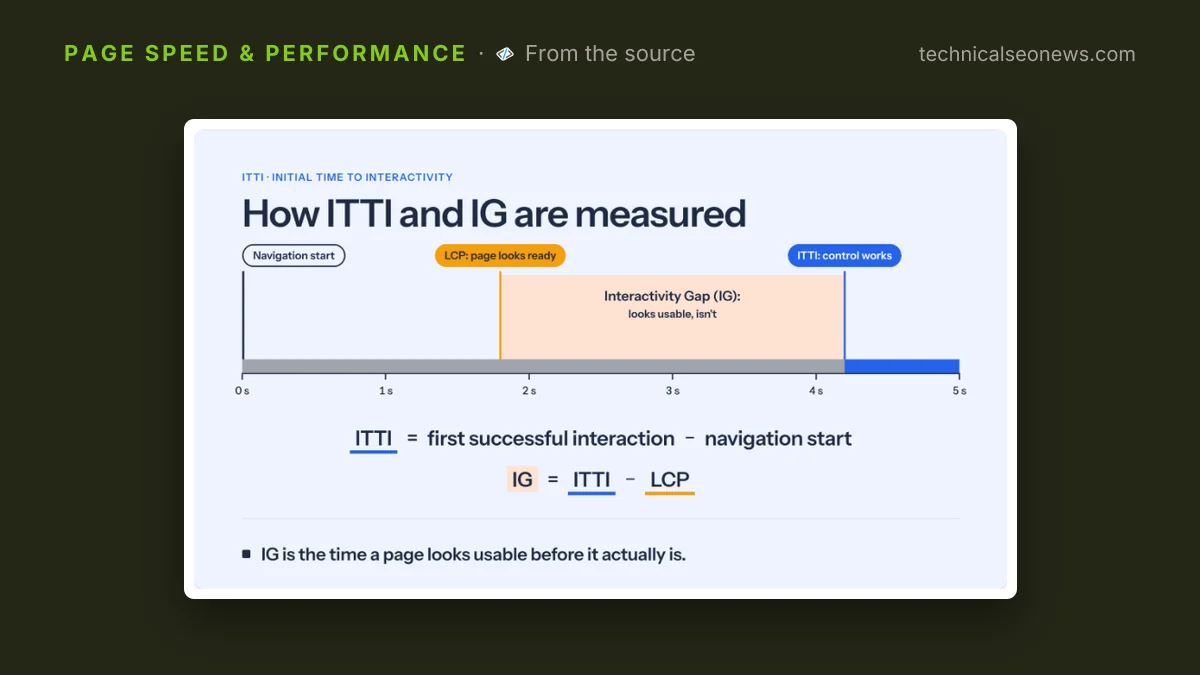
The mobile menu on brightonseo.com needed 24.3 seconds before it would open on a throttled first visit, on loads where Largest Contentful Paint landed at 2.2 seconds. Selim Koç, who tunes ecommerce platforms for speed, ran the tests and published them on October 29 in a guide for Sitebulb, the company behind the website crawler of the same name. He proposes a name for the time until one visible control first does what it is meant to do, Initial Time to Interactivity, and calls its distance from LCP the Interactivity Gap.
Lighthouse gave that same page 96 on Performance. Koç repeated the tap in desktop Chrome under the same Slow 4G throttling and watched DevTools record an interaction latency of 48ms while the menu stayed shut. His explanation is that no click handler had been attached yet, so the browser had nothing to run and the click finished almost instantly.
Why the metrics stay green
INP measures the latency of interactions the page handled, and a tap that triggers nothing is handled very fast. CrUX puts the site’s INP at around 100ms from real visitors. The likelier explanation is the same one: INP times a response, and a dead control produces no response to time. Koç’s position is that INP was never designed to say whether a control was ready, which is fair to the metric. It also means nothing in Core Web Vitals answers that question.
Readiness is also per control rather than per page. Koç’s Amazon run painted its LCP at 1.32 seconds, then brought its controls to life across the next four seconds in an order a visitor has no way to anticipate.
| Amazon control, Slow 4G | First works at |
|---|---|
| Category slider | 1.35s |
| Product slider | 3.78s |
| Mobile menu | 4.14s |
| Delivery dropdown | 5.50s |
Google’s homepage is the softer version of the same pattern. Its LCP lands at 0.6 seconds while the AI, voice and image search controls take 4.3 seconds, and Koç calls those delayed clicks rather than dead ones, because the taps are recorded and fire once the handler arrives instead of being thrown away. Whether a site replays those taps decides if a slow handler costs the visitor a wait or the action itself.
The numbers are preliminary, and Koç says so. Each site got five incognito loads from a clean start in Chrome 154 under the DevTools Slow 4G preset, with the median reported, and the test tool taps the control every 25ms until it responds. Repeated runs warm the CDN near his test location, so later loads can look faster than a real first visit, and the repeated taps may be interacting with click queuing themselves. ITTI is a proposal rather than a standard, and there is no published threshold for what counts as a good one.
What to do
Hand-time the one or two above-fold controls your visitors reach for first. A stopwatch and a phone work, at a cost of two or three tenths of a second in accuracy, and the ITTI test tool with its Chrome extension is more precise. Run it in incognito on Slow 4G, since this is a first-visit problem: returning visitors have the JavaScript cached, which hides the delay from you and not from people who have never been to the site.
Choose the control by what people tap, not by what is easiest to measure. Koç would rank a hero slider above a menu button, on the grounds that a first-time visitor is likelier to use it. Dead-click tracking in whatever session tool is already installed will say which control it is on your own site.
The cheapest fix is to show the control as inactive until it works. Brightonseo.com’s icon is gray until the handler attaches and blue afterwards, which Koç credits as more honest than the common practice of styling a control as active from first paint, and his first rule is to not present something as interactive until it is. A disabled appearance is cheap and tells the visitor to wait.
The real work is attaching the handler earlier, and it starts with checking which bundle the control’s code ships in, because deferring that code does not always defer it. A single static import elsewhere in the app can cancel a lazy boundary and ship the chunk in the initial payload anyway, so confirm the current split before rewriting anything.