A crawler that runs inside Google Sheets stays internal for now
Summary
Botpresso, an SEO agency, has built a Google Sheets add-on that checks status codes, redirect chains and canonicals on a pasted URL list, and nobody outside the agency can install it.
Run the same checks in the crawler you already have: the full redirect chain, plus each destination's canonical and robots directives beside its status code.
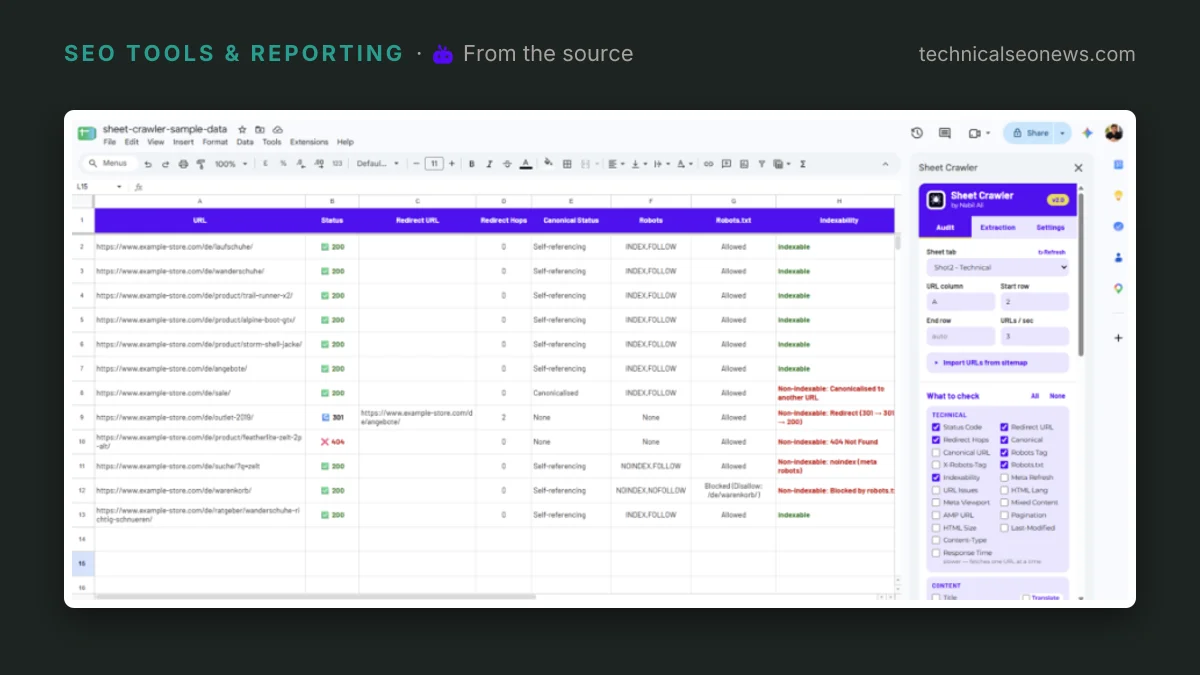
Botpresso, an SEO agency, has built a Google Sheets add-on that crawls a pasted list of URLs and writes the results back as columns in the same sheet. Sheet Crawler runs “status codes and full redirect chains, canonicals, meta robots and X-Robots-Tag, and robots.txt” across up to 15,000 URLs per audit, according to Nabil Ali, the Botpresso SEO analyst who built it and wrote the post. Nobody outside the agency can run it: the post answers the availability question with “Not yet. It’s an internal tool our team uses for client work.”
The column that does the most work is the indexability verdict, which the post says explains “in plain words why a page isn’t indexable, such as ‘noindex’ or ‘canonicalised to another URL’”. That sentence is what a redirect map needs more than it needs a status code. A destination can answer 200 and still carry a canonical pointing at a different URL, and nothing in a status column says so. Status codes mislead in the same quiet way, including a 302 that leaves the old URL ranking and the new one ignored.
Two details place the tool squarely in migration work: URLs can be imported straight from an XML sitemap, and password-protected staging sites are handled with Basic Auth. Custom extraction with CSS selectors, XPath or regex can be saved as reusable templates, so a check invented for one client’s markup survives to the next audit.
What the add-on removes is a round trip every list job pays for: “open a desktop crawler, paste the list into list mode, run it, export the results, and copy the right columns back into the sheet.” Ali’s post calls that time plus “room for error”. The likelier place for the error is the last step, where exported rows get pasted back against the wrong key and a handful of destinations acquire another row’s status.
Botpresso is clear about where this stops. “For full-site crawls and deep site architecture work we still use a dedicated crawler,” the post says. The reason is not spelled out, but a crawler fed a list only sees the URLs it was handed, so orphan pages, click depth and anything that turns up by following internal links stay invisible to it.
What to do
There is nothing to install, so the useful part is the method. Run these checks in whatever crawler you already have.
- Follow the full chain instead of the first response. A row that reads 301 on the first request can still end at a second redirect or a 404.
- Pull each destination’s canonical, meta robots and X-Robots-Tag into columns next to its status code. Those are the fields an indexability verdict is assembled from.
- Check robots.txt against the destination list, not the source list. A blocked destination never gets far enough to show its canonical.
- Do not write off a 4xx destination as gone, since Google can keep a 4xx page in the index and drop only its snippet.