Lazy-loading the hero image delays LCP instead of speeding it up
Summary
Below-the-fold images are safe to lazy-load in every major browser, because each one starts the download before the image reaches the screen. The hero image is the exception.
A lazy hero waits for layout before the browser requests it, and in a test by Calibre, a performance monitoring vendor, the request started more than twice as late. Check the rendered HTML of each template for loading="lazy" on the first large image and remove it.
Lazy-loading is meant to make pages faster, but on the hero image it does the opposite. The browser cannot request a lazy image until it has laid out the page, so the image that sets Largest Contentful Paint (LCP, the time until the biggest element on the first screen appears) arrives later, not sooner. Calibre’s guide to native lazy loading measured the delay and reports that 17% of pages lazy-load that image anyway. Calibre, which sells web performance monitoring, also lists how far each browser fetches ahead for images further down the page.
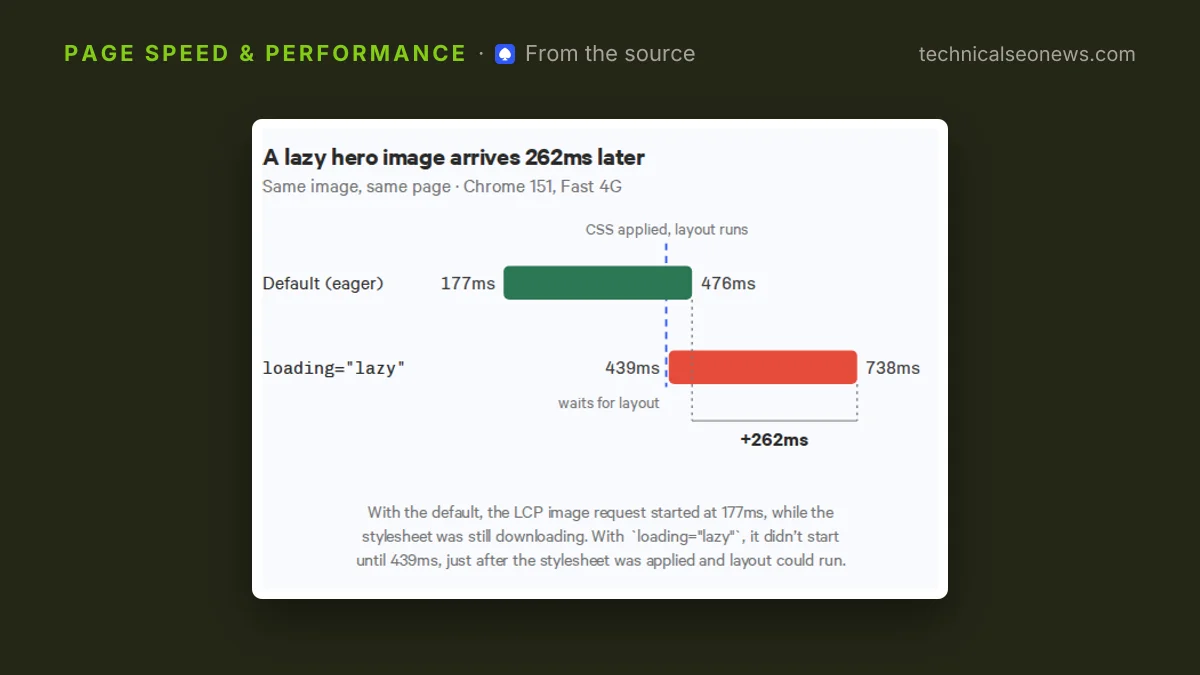
In Calibre’s test, the hero image request started at 177ms with the default setting, while the stylesheet was still downloading. With loading="lazy" the request did not start until 439ms, just after the stylesheet was applied and layout could run. The cause is how browsers find images. The preload scanner, the part of the browser that reads raw HTML early and starts downloads, fetches an eager image straight away. A lazy image has to wait until the browser has worked out where it sits on the page. On a mobile connection the stylesheet takes longer to arrive, so the hero waits longer too.
Further down the page, the cost is small
Below the fold, lazy loading is cheap in every browser because none of them waits for the image to appear. Each starts the download at some distance before the image reaches the screen, and Calibre’s post lists the distances:
| Browser | Images | Iframes | Video and audio |
|---|---|---|---|
| Chrome, 4G | 1,250px | 2,500px | 1,250px |
| Chrome, 3G | 2,500px | 3,500px | 2,500px |
| Chrome, 2G | 6,000px | 6,000px | 6,000px |
| Firefox | 600px | 600px | Not supported |
| Safari | One viewport | 0px | Not supported |
Chrome fetches further ahead on slower connections. Firefox holds one fixed margin of 600px on every side, whatever the connection. Safari gives images a full viewport in each direction but does not load a lazy iframe until it is on screen.
Safari’s iframe rule is the one most likely to show. Calibre does not measure it, but the likely result is that a slow embed just below the fold appears blank for a moment in Safari. Firefox and Safari also ignore loading="lazy" on video and audio, so those elements load straight away there.
Calibre’s warning is aimed at templates. Its post compares a blanket loading="lazy" in a shared template to preloading everything: both hurt performance, and the attribute lands on images nobody tagged by hand, the hero included.
What to do
- Open the LCP element on each main template in the DevTools Elements panel and check for
loading="lazy". Read the rendered HTML, not the template source, since a component or framework may add the attribute. - Leave the hero eager, which is the default, and add
fetchpriority="high"to it, as Calibre recommends. Keep lazy loading for media below the first screen. - Give every lazy image, video and iframe a width and height, or a CSS
aspect-ratio. Lazy media arrives after layout, and without dimensions it pushes content around and adds Cumulative Layout Shift. - With
<picture>, putloadingandfetchpriorityon the<img>. The browser ignores them on<source>.
<!-- Hero: no loading attribute, so it stays eager -->
<img src="hero.avif" width="1200" height="675" fetchpriority="high" alt="...">

<!-- Further down the page -->
<img src="chart.avif" width="800" height="450" loading="lazy" alt="...">
To confirm that below-the-fold media is deferred, open the Network panel and filter to Img and Media. Iframes show up under Doc. Tick Disable cache and reload without scrolling. Everything in that list loaded with the page, and whatever arrives once you scroll was deferred. This check will not catch a lazy hero. A lazy image already on the first screen still loads without scrolling, just later, so the Elements panel check in step 1 is the one to rely on.