Vercel adds separate blocking for AI crawlers and assistants
Summary
Vercel's firewall now takes one action for AI training crawlers and a separate one for the AI search and assistant fetchers that answer live questions, on all plans.
Check Vercel's bot catalog at bots.fyi before denying the crawler category, since it files Applebot there next to GPTBot.
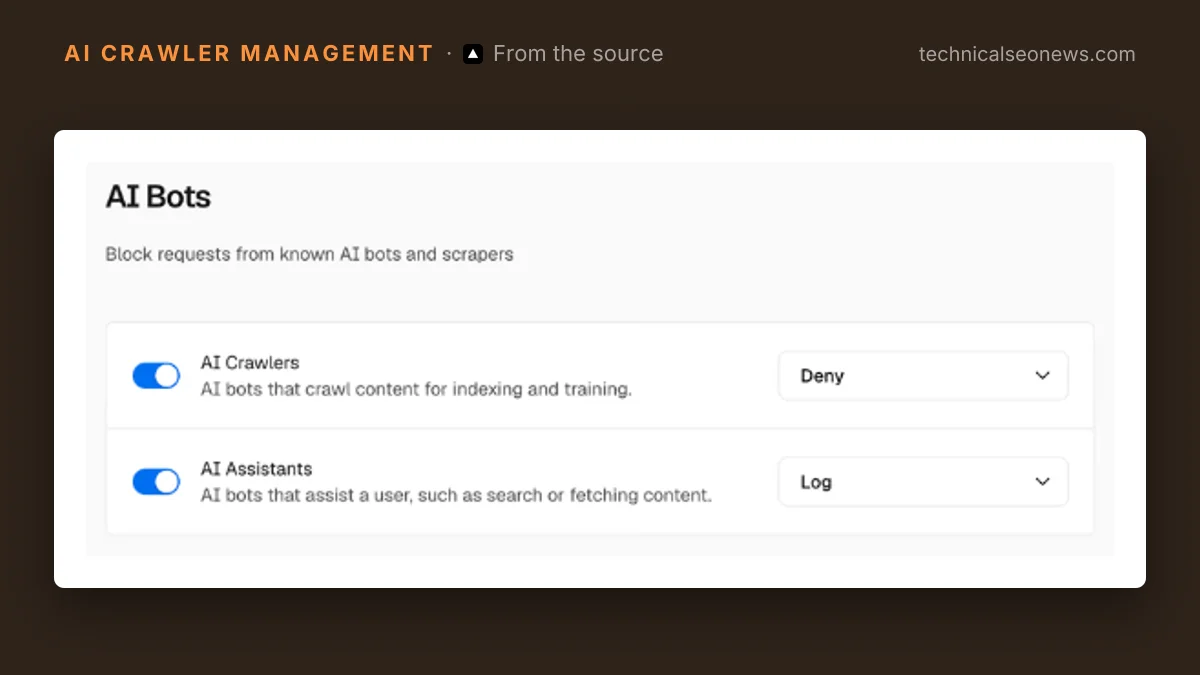
Vercel’s firewall can now take one action against AI crawlers and a different one against AI assistants, per Vercel’s changelog. Crawlers, in Vercel’s definition, are the bots that collect pages for indexing and model training. Assistants are the ones that fetch a page in response to a user action or a search query.
The controls live in the AI Bots managed ruleset, under Security > Firewall > Rules > Bot Management, behind the gear icon beside AI Bots. Each category takes its own action, Log or Deny, and the same edit works from the CLI:
vercel firewall rules edit ai-bots --category ai-crawlers --action deny --yes
vercel firewall rules edit ai-bots --category ai-assistants --action log --yes
Review with vercel firewall diff, then apply with vercel firewall publish. Vercel, the hosting platform behind Next.js, says the ruleset is available on all plans. Vercel’s documentation adds that it is off by default, shown as Allow, so a project that never opened these settings blocks nothing.
A firewall rule is not robots.txt. It drops the request at the edge, so a bot gets a response code instead of a page regardless of whether it reads directives at all, and the rule reaches crawlers that bot protection catches where robots.txt does not.
The harder question is which bots sit in each bucket. The changelog’s worked example, denying crawlers while logging assistants, is pitched as a way to keep AI answers citing a site while refusing training. The changelog names no user agent, but the documentation points to Vercel’s public bot catalog, and the catalog settles it. The search fetchers behind AI answers sit in the assistant category. The training bots sit in the crawler category.
| Bot | Operator | Vercel category |
|---|---|---|
| GPTBot | OpenAI | AI Crawler |
| ClaudeBot | Anthropic | AI Crawler |
| Applebot | Apple | AI Crawler, Search Engine Crawler |
| OAI-SearchBot | OpenAI | AI Assistant |
| Claude-SearchBot | Anthropic | AI Assistant |
| PerplexityBot | Perplexity | AI Assistant |
| ChatGPT-User | OpenAI | AI Assistant |
So the worked example does what it sounds like for OpenAI, Anthropic and Perplexity. The catch is Applebot. Vercel files Apple’s crawler, which feeds Siri and Spotlight search, as both a search engine crawler and an AI crawler, so a deny on the crawler category blocks it along with GPTBot. The assistant bucket has the opposite problem. It holds search index bots such as OAI-SearchBot next to live fetchers such as ChatGPT-User, so one action covers both. A custom rule with a bypass action runs before the managed ruleset, and that is the documented way to carve one bot out of either category.
Vercel also says it updates the rules as new bots are added. The membership of each category therefore changes without anyone touching the project, and a rule published today keeps its action while applying it to agents that did not exist when it was set. For a deny on crawlers, that is the behaviour most owners want. For a deny on assistants, it means a new AI browser can be shut out of a site whose owner last thought about this months ago.
What to do
- Open the AI Bots settings on each project and read the action currently set on both categories. The split is new, so whatever is there was not chosen with both options in front of you.
- Set assistants to log for a week before deciding anything. Assistant fetches are otherwise close to invisible, since they skip client-side analytics.
- Check the catalog at bots.fyi before denying crawlers, and decide whether losing Applebot is acceptable. If it is not, add a custom rule with a bypass action for Applebot above the managed ruleset.
- Re-read the ruleset after any notable new agent ships. The action stays put; the list of bots it applies to does not.